plex media utility

1 / 4
The main generator screen is similar to cmake except that it only shows user variables.
2 / 4
Its possible to create new variables that can be used in cmake scripts
3 / 4
Its possible to set commands that run after cmake has generated your project
4 / 4
Deployed app has all edit features stripped
❮ ❯
1 / 5

        using System.Collections.Generic;
using System.ComponentModel;
using System.IO;
using System.Text.RegularExpressions;
using System.Windows;

namespace Plex_Util
{
  public class PlexItem : INotifyPropertyChanged
  {

    public string FilePath
    {
      get => filePath;
      set
      {
        if (filePath != value)
        {
          filePath = value;
          Folder = PlexFolder.BuildFolderStructure(filePath);
          OnPropertyChanged(nameof(FilePath));
          OnPropertyChanged(nameof(Name));
        }
      }
    }

    public string Title
    {
      get => title;
      set
      {
        if (title != value)
        {
          title = value;
          OnPropertyChanged(nameof(Title));
        }
      }
    }

    public string Year
    {
      get => year;
      set
      {
        if (year != value)
        {
          year = value;
          OnPropertyChanged(nameof(Year));
        }
      }
    }

    public string Imdb
    {
      get => imdb;
      set
      {
        if (imdb != value)
        {
          imdb = value;
          OnPropertyChanged(nameof(Imdb));
        }
      }
    }
    public bool HasWarnings
    {
      get => hasWarnings;
      set
      {
        if (hasWarnings != value)
        {
          hasWarnings = value;
          OnPropertyChanged(nameof(HasWarnings));
        }
      }
    }

    public bool Dirty
    {
      get => dirty;
      set
      {
        if (dirty != value)
        {
          dirty = value;
          OnPropertyChanged(nameof(Dirty));
        }
      }
    }

    public string Name => Path.GetFileName(FilePath);
    public PlexFolder Folder { get; private set; }
    public string DisplayName => $"{title} ({year})";

    private string filePath;
    private string title;
    private string year;
    private string imdb;
    private bool dirty;
    private bool hasWarnings;

    private const string imdbPattern = @"\{imdb-(?<id>[^\}]+)\}";
    private const string yearPattern = @"\((?<year>\d{4})\)";
    private const string namePattern = @"^(?<name>.+?)\s\(";
    public event PropertyChangedEventHandler PropertyChanged;

    public PlexItem(string source)
    {
      filePath = source;
      Load();
    }

    private void UpdateDirtyFlag()
    {
      string oldName = Path.GetFileName(FilePath);
      string newName = $"{DisplayName} {{imdb-{Imdb}}}";
      if (oldName != newName)
      {
        MarkDirty();
      }
    }

    internal bool Save()
    {
      if (Dirty && !hasWarnings)
      {
        // first apply the folder chnages

        string oldName = Path.GetFileName(FilePath);
        string newName = $"{DisplayName} {{imdb-{Imdb}}}";
        string stageingDir = Path.Combine(filePath + " - staging");


        Dictionary<string, string> movedFiles = Folder.MoveFiles(this, stageingDir);
        if (Directory.GetFiles(FilePath, "*", SearchOption.AllDirectories).Length == 0)
        {
          Directory.CreateDirectory(stageingDir);
          Directory.Delete(FilePath, true);
          filePath = oldName != newName ? Path.Combine(Path.GetDirectoryName(filePath), newName) : filePath;
          Directory.Move(stageingDir, filePath);
        }
        else
        {
          MessageBoxResult result = MessageBox.Show($"Error occured while trying to apply file settings: one ore more files were not moved. Would you like to retry?", "Exception", MessageBoxButton.YesNo, MessageBoxImage.Error);
          return false;
        }

        string removeImdbPattern = @"\{imdb-[^\}]+\}";
        foreach (string file in Directory.GetFiles(FilePath, "*", SearchOption.AllDirectories))
        {
          string dir = Path.GetDirectoryName(file);
          string name = Path.GetFileNameWithoutExtension(file);
          string ext = Path.GetFileName(file).Substring(Path.GetFileNameWithoutExtension(file).Length);
          string newFileName = Regex.Replace(name, removeImdbPattern, "").Trim() + ext;
          if (newFileName != Path.GetFileName(file))
          {
            File.Move(file, Path.Combine(dir, newFileName));
          }
        }

        OnPropertyChanged(nameof(Name));
        OnPropertyChanged(nameof(FilePath));
        Dirty = false;
        Folder = PlexFolder.BuildFolderStructure(filePath);
        Folder.Validate(this);
        return true;
      }
      return false;
    }

    protected virtual void OnPropertyChanged(string propertyName)
    {
      UpdateDirtyFlag();
      PropertyChanged?.Invoke(this, new PropertyChangedEventArgs(propertyName));
    }
    private void Load()
    {
      string folderName = Path.GetFileName(filePath);

      Regex nameRegex = new Regex(namePattern);
      Match nameMatch = nameRegex.Match(folderName);

      if (nameMatch.Success)
      {
        title = nameMatch.Groups["name"].Value.Trim();
      }
      else
      {
        title = folderName.Trim();
      }

      // Match for year
      Regex yearRegex = new Regex(yearPattern);
      Match yearMatch = yearRegex.Match(folderName);

      if (yearMatch.Success)
      {
        year = yearMatch.Groups["year"].Value;
      }

      // Match for IMDb ID
      Regex imdbRegex = new Regex(imdbPattern);
      Match imdbMatch = imdbRegex.Match(folderName);

      if (imdbMatch.Success)
      {
        imdb = imdbMatch.Groups["id"].Value;
      }

      if (string.IsNullOrEmpty(imdb))
      {
        foreach (string file in Directory.GetFiles(FilePath, "*", SearchOption.AllDirectories))
        {
          imdbMatch = imdbRegex.Match(file);

          if (imdbMatch.Success)
          {
            imdb = imdbMatch.Groups["id"].Value;
            break;
          }
        }
      }
      Folder = PlexFolder.BuildFolderStructure(filePath);
    }

    internal void MarkDirty()
    {
      Dirty = true;
    }
  }
}

       
Root for the plex view
2 / 5

        using System.Collections.Generic;
using System.ComponentModel;
using System.IO;

namespace Plex_Util
{
  /// <summary>
  ///  Represents a media file in a plex file catagory such as .mkv file
  ///  <see cref="PlexFileCatagory"/>
  /// </summary>
  public class PlexFile : INotifyPropertyChanged
  {
    public string FilePath
    {
      get => filePath;
      set
      {
        if (filePath != value)
        {
          filePath = value;
          OnPropertyChanged(nameof(FilePath));
          OnPropertyChanged(nameof(FileName));
          OnPropertyChanged(nameof(Parent));
          OnPropertyChanged(nameof(Duration));
        }
      }
    }

    public string Duration => FileProperties.GetMediaDuration(FilePath);
    public string Parent => Path.GetDirectoryName(FilePath);
    public string FileName => Path.GetFileName(FilePath);
    public IReadOnlyList<IPlexFileProperty> Properties => properties;
    private List<IPlexFileProperty> properties;
    private string filePath;

    public event PropertyChangedEventHandler PropertyChanged;

    public PlexFile(string filePath, List<IPlexFileProperty> properties)
    {
      this.filePath = filePath;
      this.properties = properties;
    }
    protected virtual void OnPropertyChanged(string propertyName)
    {
      PropertyChanged?.Invoke(this, new PropertyChangedEventArgs(propertyName));
    }
  }
}

       
Represents a single file in the plex collection such as a movie or episode
3 / 5

        using System.Collections.Generic;
using System.IO;
using System.Linq;

namespace Plex_Util
{
  /// <summary>
  /// Represents a folder which contains data for a plex item such as a mobie or series.
  /// </summary>
  public class PlexFolder
  {
    /// <summary>
    /// Creates a plex folder from a local folder by scanning the local folder and putting all the files in appropriate catagories.
    /// </summary>
    /// <param name="path"></param>
    /// <returns></returns>
    public static PlexFolder BuildFolderStructure(string path)
    {
      IPlexCatagory[] catagories = new IPlexCatagory[] {
        new PlexFileCatagory( "Movie Editions", path, new PlexMovieFileStrategy(), false),
        new PlexFileCatagory("Behind The Scenes", path, new PlexExtraFileStrategy()),
        new PlexFileCatagory( "Deleted Scenes", path, new PlexExtraFileStrategy()),
        new PlexFileCatagory( "Featurettes", path, new PlexExtraFileStrategy()),
        new PlexFileCatagory( "Interviews", path, new PlexExtraFileStrategy()),
        new PlexFileCatagory( "Scenes", path, new PlexExtraFileStrategy()),
        new PlexFileCatagory( "Shorts", path, new PlexExtraFileStrategy()),
        new PlexFileCatagory( "Trailers", path, new PlexExtraFileStrategy()),
        new PlexFileCatagory( "Other", path, new PlexExtraFileStrategy()),
        new PlexFolderCatagory("Seasons", path, new PlexSeasonsFolderStrategy()),
        new PlexFileCatagory( "Specials", path, new PlexSeasonSpecialsFileStrategy()),
      };

      PlexUncatagorizedFileCatagory uncatagorizedFiles = new PlexUncatagorizedFileCatagory(path, catagories);
      catagories = new List<IPlexCatagory>(catagories) { uncatagorizedFiles }.ToArray();

      IPlexAsset[] assets = new IPlexAsset[] {
        new PlexPosterAsset()
      };

      IPlexFileProperty[] properties = new IPlexFileProperty[] { };

      return new PlexFolder(path, assets, catagories, properties);
    }

    public IReadOnlyList<IPlexCatagory> Catagories => catagories;
    public IReadOnlyList<IPlexFileProperty> Properties => properties;
    public IReadOnlyList<PlexAssetViewModel> Assets => assets;
    public string LocalPath => localPath;
    public string Name => name;

    private string name;
    private string localPath;
    private List<PlexAssetViewModel> assets;
    private List<IPlexCatagory> catagories;
    private List<IPlexFileProperty> properties;

    public PlexFolder(string path, IPlexAsset[] assets, IPlexCatagory[] catagories, IPlexFileProperty[] properties)
    {
      this.name = Path.GetFileName(path);
      this.localPath = path;
      this.assets = new List<PlexAssetViewModel>();
      this.properties = new List<IPlexFileProperty>(properties);
      this.catagories = new List<IPlexCatagory>(catagories);

      if (assets.Length > 0)
      {
        this.catagories.Add(new PlexAssetFileCatagory(localPath, assets));
      }

      foreach (IPlexFileProperty property in properties)
      {
        property.ForFile(Path.Combine(localPath, name));
      }
    }

    public IPlexCatagory FindFileCatagory(PlexFile file)
    {
      foreach (IPlexCatagory catagory in catagories)
      {
        IPlexCatagory catagoryforFile = catagory.FindCatagoryForFile(file);
        if (catagoryforFile != null) return catagoryforFile;
      }
      return null;
    }

    public IPlexCatagory FindFolderCatagory(PlexFolder folder)
    {
      foreach (IPlexCatagory catagory in catagories)
      {
        IPlexCatagory catagoryforFile = catagory.FindCatagoryForFolder(folder);
        if (catagoryforFile != null) return catagoryforFile;
      }
      return null;
    }

    public int GetFileCount()
    {
      int count = 0;
      foreach (IPlexCatagory catagory in catagories)
      {
        count += catagory.GetFileCount();
      }
      return count;
    }

    internal Dictionary<string, string> MoveFiles(PlexItem item, string tempFilePath)
    {
      Dictionary<string, string> result = new Dictionary<string, string>();
      foreach (IPlexCatagory catagory in catagories)
      {
        Dictionary<string, string> catagoryMovedFiles = catagory.MoveContentTo(item, tempFilePath);
        result = result.Concat(catagoryMovedFiles).ToDictionary(x => x.Key, x => x.Value); ;
      }
      return result;
    }

    internal void Validate(PlexItem item)
    {
      item.HasWarnings = false;
      foreach (IPlexCatagory catagory in catagories)
      {
        catagory.Validate(item);
      }
    }

    internal bool HasChanged(PlexItem item)
    {
      foreach (IPlexCatagory catagory in catagories)
      {
        if (catagory.HasChanges(item)) return true;
      }
      return false;
    }

    internal bool ValidateChanges(PlexItem item)
    {
      foreach (IPlexCatagory catagory in catagories)
      {
        if (!catagory.ValidateChanges(item)) return false;
      }
      return true;
    }
  }
}
       
Represents a folder in a plex collection
4 / 5

        using System;
using System.Collections.Generic;
using System.Linq;
using System.Text;
using System.Threading.Tasks;

namespace Plex_Util
{
  public class PlexMovieFileStrategy : IPlexFileStrategy
  {
    public List<IPlexFileProperty> CreateFileProperties()
    {
      return new List<IPlexFileProperty> { new PlexMovieEditionFileProperty() };
    }

    public string GetFileName(PlexItem item, PlexFile file)
    {
      return item.DisplayName;
    }
  }

}

       
Defines properties etc for a movie file
5 / 5

        using System;
using System.Collections.Generic;
using System.Linq;
using System.Text;
using System.Text.RegularExpressions;
using System.Threading.Tasks;

namespace Plex_Util
{

  public class PlexMovieEditionFileProperty : PlexFilePropertyBase<string>
  {
    public override string Name => "Edition";

    public override bool CheckValue()
    {
      return string.IsNullOrEmpty(Value) || ValidationUtils.CheckWindowsFileName(Value);
    }

    public override string DecoratePlexName(string suggestedName)
    {
      return string.IsNullOrEmpty(Value) ? suggestedName : $"{suggestedName} {{edition-{Value}}}";
    }

    public override void ForFile(string file)
    {
      Match match = Regex.Match(file, @"\{edition-(.*?)\}");
      if (match.Success)
      {
        Value = match.Groups[1].Value;
      }
    }
  }
}

       
Specific movie file property for setting the movie edition
❮ ❯

Summary

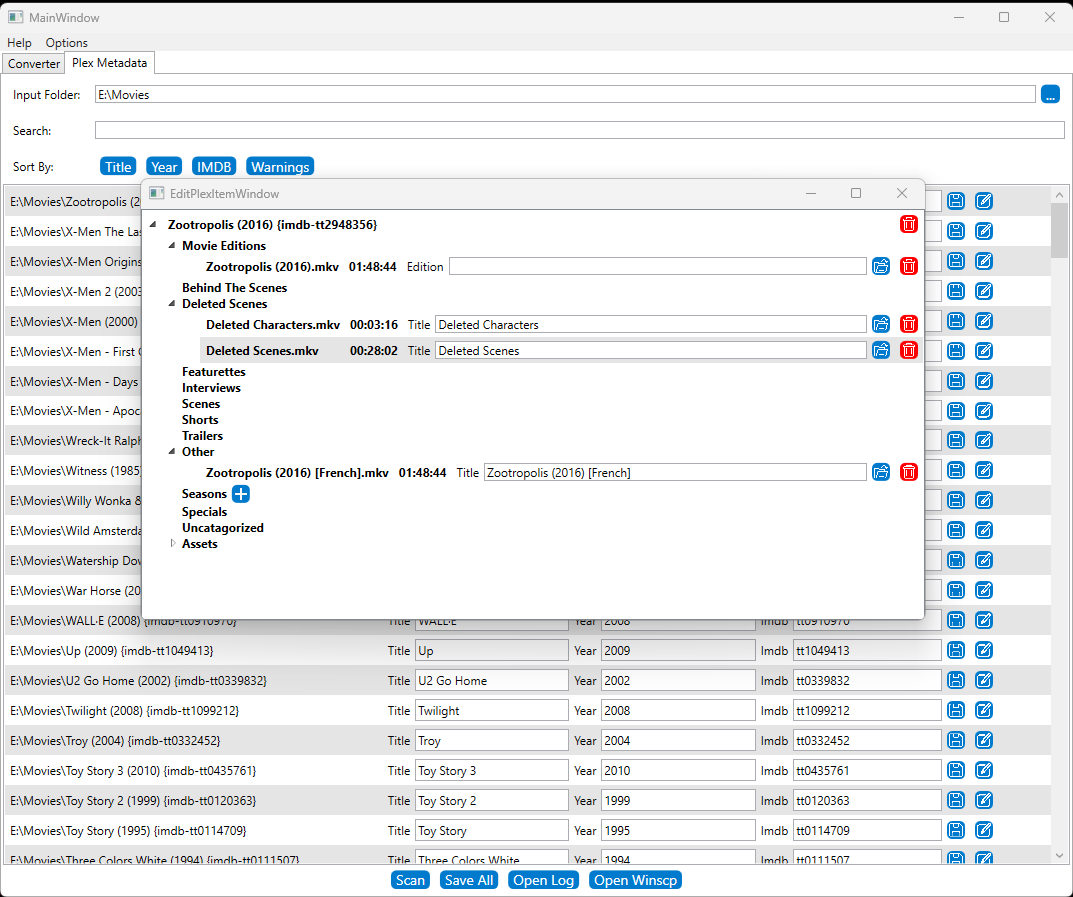
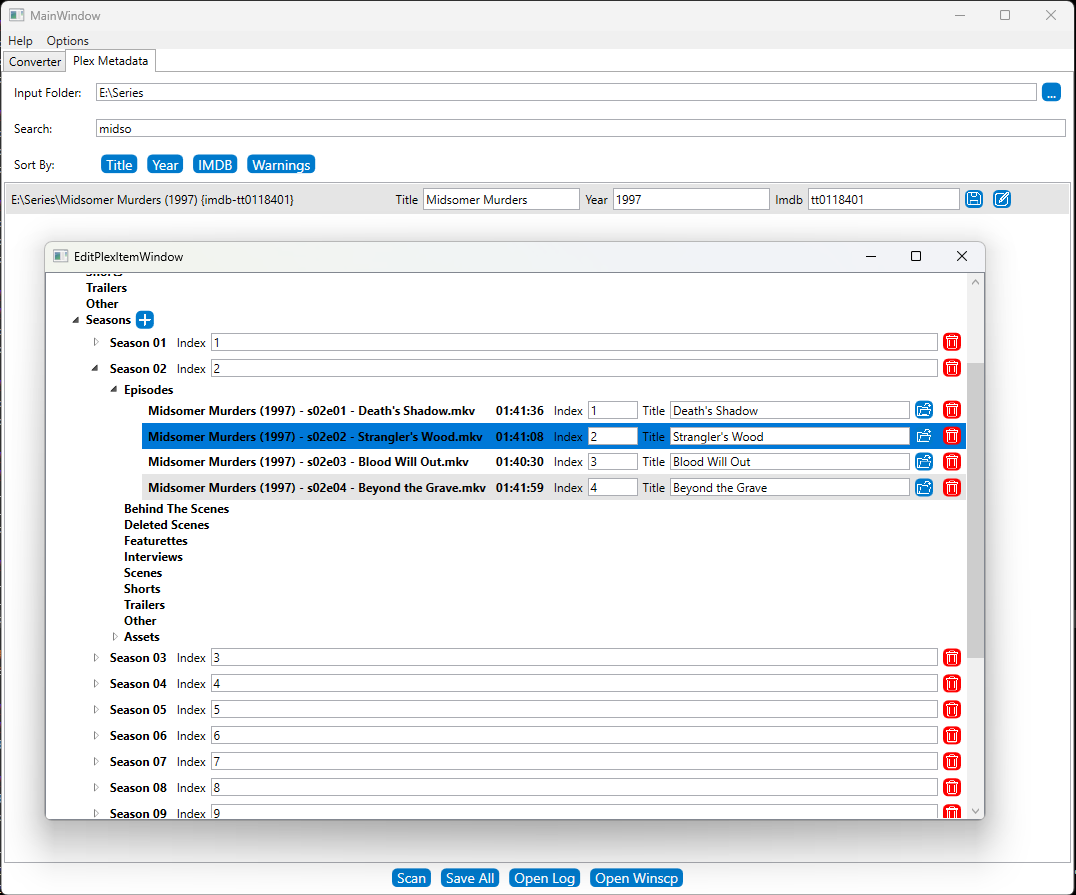
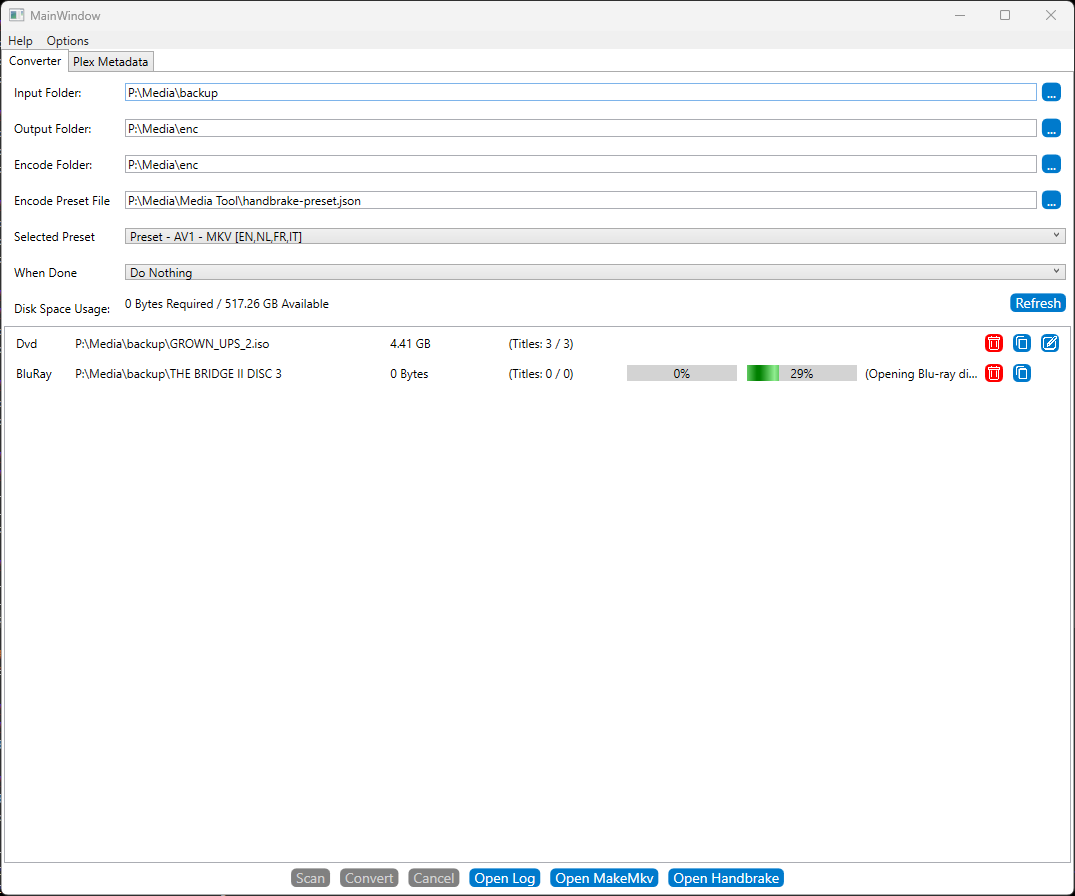
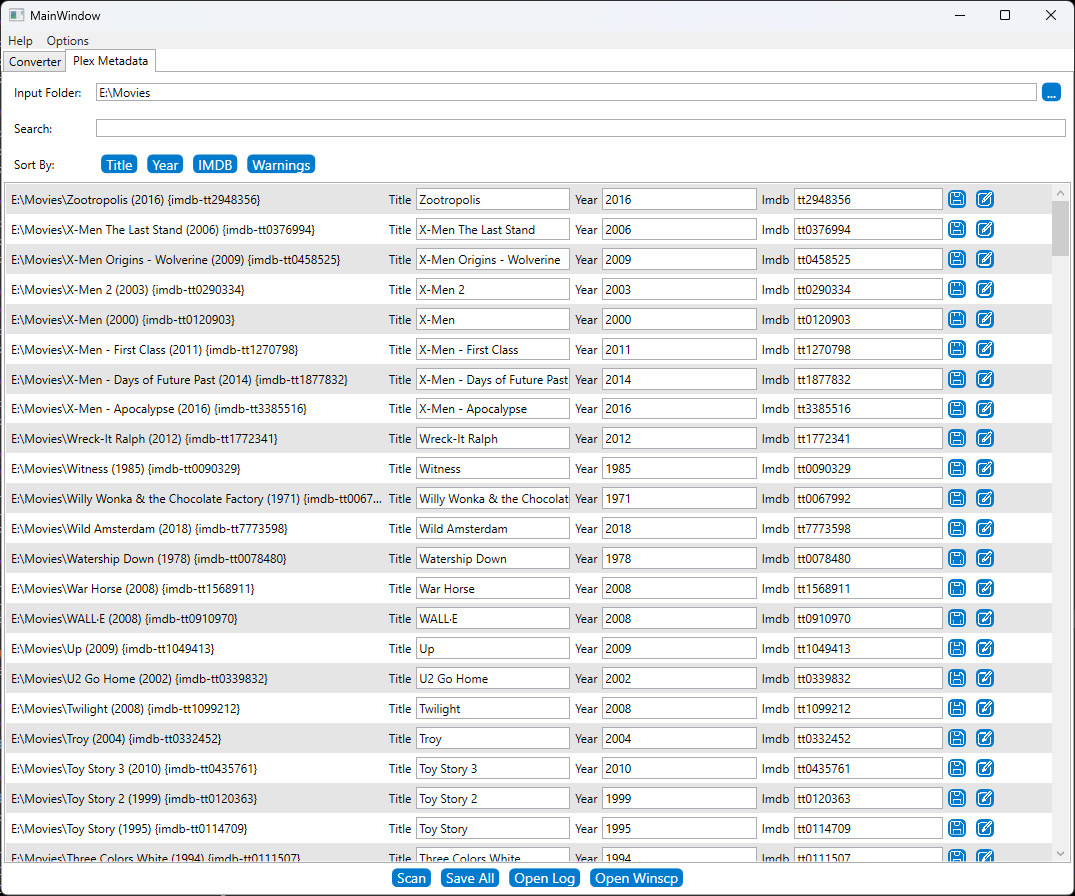
The plex media utitilty simplifies tasks to help digitize dvd and blu-ray disks by consolidating tools for ripping and encoding them into a single GUI. It additionally has features to help origanize the resulting files in a format that is supported by plex.
Go to Project Site

Contributions

  • Everything (Personal Project)

Tools Used

visual studio
wpf

Team

Programmers: 1

Project length

1 week

Details

This project was started when we were digitizing a big collection of dvd’s and blu-rays. The process involves multiple tools to rip the dvds and then encode them. after doing a couple I felt like it should be a lot easier and so this project was started. The tool has the following features:

  • Convert and encode ripped dvd's in one go
  • manage folder structure in a way thats compatible with plex for self hosting.

Download